Passport, visa and ID photos · Myanmar
Myanmar e-visa photo: check and make yours
Your Myanmar e-visa photo, checked against the official rules, framed and sized, ready to upload. Official size: 38 x 46 mm. Background: plain white or off-white. Rules read on evisa.moip.gov.mm on 5 November 2026.
- Take or choose a photo
- We check it against the official rules and frame it
- Download the exact file
Free check. Your Myanmar e-visa photo, €6.99, only once it passes: the ready file, unlimited retakes for 30 days. Refund if the authority rejects it.
Your photo stays on your device: nothing is uploaded, and no face is recognised.
Before you take it
- Stand a step in front of a plain white wall, with nothing behind you.
- Face a window or soft light: even light on the face, no shadows on it or behind.
- Phone at eye level, about 1.5 m away: ask someone, or hold it at arm's length.
- Take your glasses off.
- A neutral face or a natural smile, eyes open, looking straight at the camera.
Check and make your photo
The first photo loads the face finder and the background outline from this site, about 15 MB, once.
We made the background plain, as the rules ask. Turn it off to see your original.
The new background follows an outline of you found in this page. Around fine or loose hair its edge can look soft: look closely, and if it does, retake against a plain wall.
The whole photo's brightness and colour, and any shadow on the wall behind you. Your face is never retouched, smoothed or reshaped.
Adjust the framing
See every measurement
| Check | Measured | Result |
|---|
Your Myanmar e-visa photo
€6.99- The exact 991 x 1200 px file, ready to upload
- The acceptance report
- Detail check of glasses, expression, shadows and more (opt-in: our AI model, run in the EU)
- Unlimited retakes and the whole family's photos for this document, for 30 days
- Refund if the authority rejects it
Choose a photo first.
Pay only once your photo passes: the button turns on once it passes every check. One payment, no subscription. Rejected by the authority? Email us the rejection within 30 days and we refund you in full. While you pay, your photo waits in this browser on this device for up to 24 hours: it is never uploaded.
The face finder and the background outline run in this page from files served by this site (sources and licences). They find where a face is in the photo; they never recognise who it is.
Meets the published spec as checked on 5 November 2026. WinPhoto is not affiliated with any government.
Apply only on evisa.moip.gov.mm, run by Myanmar's Ministry of Immigration and Population. Its photo requirement is a 3.8 x 4.6 cm colour photo taken in the last 3 months, on a plain white or off-white background, with no eyeglasses, a neutral expression or a natural smile and both eyes open. The photo file can be up to 2MB.
Take the photo
Starting the camera…
The camera picture stays on this device: nothing is uploaded.
The rules at a glance
For the Myanmar eVisa (evisa.moip.gov.mm) applicant photo: tourist and business eVisa, as the official rules state them.
- Size
- 38 x 46 mm (3.8 x 4.6 cm, or 1.5 x 1.8 inches (digital upload))
- The file we make
- 991 x 1,200 pixels
- Background
- Plain white or off-white.
- Glasses
- Not allowed
- Expression
- A neutral face or a natural smile, eyes open, looking straight at the camera.
- Taken
- In the last 3 months
- Edits
- Background and light only: we never change your face. The official pages quoted don't forbid editing; we limit ourselves to the background and overall light.
All the official rules and sources
- 3.8 cm wide x 4.6 cm high (1.5 x 1.8 inches); file up to 2MB; the user guide lists JPG (PDF is for documents)
- colour photo taken in the last 3 months
- plain white or off-white background
- take off your eyeglasses
- neutral expression or a natural smile, both eyes open; face the camera directly with the full face in view
- clothing normally worn on a daily basis
- upright and clearly seen; the form asks you to fit your face inside its crop frame
For: eVisa application on evisa.moip.gov.mm (Ministry of Immigration and Population): tourist and business eVisa; the photo is uploaded in the form's Photo & Document step.
Official source: evisa.moip.gov.mm, checked on 5 November 2026.
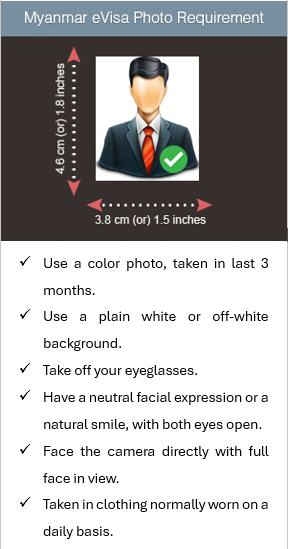
Myanmar eVisa Photo Requirement
4.6 cm (or) 1.8 inches
3.8 cm (or) 1.5 inches
Use a color photo, taken in last 3 months.
Use a plain white or off-white background.
Take off your eyeglasses.
Have a neutral facial expression or a natural smile, with both eyes open.
Face the camera directly with full face in view.
Taken in clothing normally worn on a daily basis.
Official source: evisa.moip.gov.mm, checked on 5 November 2026.
Passport Size Color Photo
Select your image file on your computer(2MB Max).
Please check your photo. If your photo is not upright or not seen clearly, please upload again.
Official source: evisa.moip.gov.mm, checked on 5 November 2026.
Step 3: Upload Photo & Documents
Upload the required documents and Photo.
Note: Accepted file formats: JPG or PDF
File size limit: 2MB.
Adjust the photo by dragging or resizing the rectangle frame to ensure your face is fully placed within it.
Official source: evisa.moip.gov.mm, checked on 5 November 2026.
A recent digital passport-sized photograph.
Meets the published spec as checked on 5 November 2026. WinPhoto is not affiliated with any government. Rules change: check the official page before you apply.
How to use it
- Stand facing the camera in front of a plain, light wall, with even light on your face.
- Tap Take the photo and follow the outline and the tips on screen, or choose a photo you have. The page finds your face and frames it to the rules.
- Fix anything the page lists, each with its own tip. Adjust the framing if you need to, and move Top of head if the dashed line is not at the top of your head.
- Tick what only you can confirm.
- Save the file.
Questions
- What size is the Myanmar e-visa photo?
- Printed, 38 x 46 mm (3.8 x 4.6 cm, or 1.5 x 1.8 inches (digital upload)). The file: JPEG; up to 2,000 KB. These are the official rules as checked on 5 November 2026. This page makes a 991 x 1,200 pixel JPEG file.
- What background does the Myanmar e-visa photo need?
- Plain white or off-white.
- Can I wear glasses in my Myanmar e-visa photo?
- No: the official rules do not allow glasses in the photo. If you cannot take them off, see the official page.
- Can I smile in my Myanmar e-visa photo?
- Neutral facial expression or a natural smile, with both eyes open; facing the camera directly with the full face in view.
- How recent must my Myanmar e-visa photo be?
- Taken in the last 3 months. These are the official rules as checked on 5 November 2026.
- Can I take my Myanmar e-visa photo at home?
- The official rules, as checked on 5 November 2026, ask for no photographer or studio, so a photo taken at home can meet them if it meets every rule on this page.
- Is my photo uploaded?
- No. The photo is read and checked in your browser, and any file is saved on your device. The page tells our server only that a photo was checked, that it passed, or that a file was saved; never the photo, your face or any measurement. It finds where your face is in the photo; it never recognises who you are.
- How is the head measured?
- The page finds your chin and eyes in the photo and estimates the top of your head from your forehead, since hair hides it: the dashed line shows the estimate. If it is not at the top of your head, move it with Top of head and the checks follow.
- Will my photo be accepted?
- Only the issuing authority decides. A photo that passes every check here meets the published size, head and background rules as checked on 5 November 2026; you confirm the rest, such as glasses, expression and how recent the photo is.
- What does buying your Myanmar e-visa photo add?
- Your Myanmar e-visa photo, €6.99: the exact 991 x 1200 px file, the acceptance report, the Detail check, unlimited retakes and the whole family's photos for this document for 30 days. Pay only once your photo passes. Refund if the authority rejects it. Paid once, with no subscription. In the Detail check our AI model, run in the EU, checks glasses, expression, shadows and more if you choose to send it the photo. Without buying you can check any photo and save a small preview with a watermark.