Passport, visa and ID photos · Fix a photo
Passport photo background not white or not plain: how to fix it
A wall that photographs grey or yellow, a pattern, or the wrong colour for the document: the background is the rule authorities write about most. Here is how to fix it, then what each authority's own page says.
Your photo stays on your device: nothing is uploaded, and no face is recognised.
How to fix it
- Stand a good step in front of a plain wall or a hung sheet, so that no shadow or texture falls on it.
- Face a window in daylight. A white wall turns grey in dim light and yellow under a lamp.
- Look up the colour your document asks for below: the colour one document asks for can fail another.
- If your document's rules forbid edited photos, don't paint the background in with an app. Retake.
The free check measures your background: whether it is plain, and whether its colour is the one your document asks for. Where the rules allow an edited photo, the page can make the background plain for you; where they forbid it, it says so and asks for a retake.
Check your photo against your document's rules
Choose your document: its page checks your photo in your browser, free. The indented words are the issuing authority's own, from the official page linked beside them, read on the date given. WinPhoto is not affiliated with any government. Only the authority decides whether it accepts a photo.
Australia
-
Australian citizenship application photo (ImmiAccount upload; 35-40 x 45-50 mm print for paper and Form 1195)
be unedited (do not remove background, moles, wrinkles, scars or red eyes)
be of good quality, in colour, taken against a neutral or light grey coloured background that contrasts with your face
Official page, read on 4 November 2026. -
Australian passport (printed photos)
a plain white or light grey background that contrasts with your face
Official page, read on 4 November 2026. -
Australian passport for a baby or young child (printed photos)
a plain white or light grey background that contrasts with your face
Official page, read on 4 November 2026. -
Australian visa application photo (ImmiAccount digital upload; passport-size print for paper)
unedited (background, moles, wrinkles, scars or red eyes should not be removed).
of good quality, in colour and taken against a neutral or light grey coloured background that contrasts with the applicant's face
Official page, read on 4 November 2026. -
Australian visa photo for a baby or child (ImmiAccount digital upload; passport-size print for paper)
unedited (background, moles, wrinkles, scars or red eyes should not be removed).
of good quality, in colour and taken against a neutral or light grey coloured background that contrasts with the applicant's face
Official page, read on 12 November 2026.
Brazil
-
Brazil e-Visa (VIVIS visit visa online, citizens of Australia, Canada, the US and China) photo
Passport-style photo (2” x 2”, white background)
Official page, read on 4 November 2026.
Canada
-
Canada Temporary Resident (visitor) Visa application photo (IRCC)
The photographs must be clear, well defined and taken against a plain white or light-coloured background.
Official page, read on 15 November 2026. -
Canada permanent residence / permanent resident (PR) card photo
Background: plain, untextured and white
Official page, read on 15 November 2026. -
Canada permanent residence / permanent resident (PR) card photo for a baby or child
Background: plain, untextured and white
changing the background, including removing shadows
Official page, read on 15 November 2026. -
Canada study permit application photo (IRCC)
The photographs must be clear, well defined and taken against a plain white or light-coloured background.
Official page, read on 15 November 2026. -
Canada super visa (parents and grandparents) application photo (IRCC)
The photographs must be clear, well defined and taken against a plain white or light-coloured background.
Official page, read on 15 November 2026. -
Canada work permit application photo (IRCC), with the International Experience Canada digital photo
The photographs must be clear, well defined and taken against a plain white or light-coloured background.
Official page, read on 15 November 2026. -
Canadian child passport for a baby or young child (printed photos)
changing the background, including removing shadows
have a plain white or light-coloured background that shows a clear difference between your child's face and the background
Official page, read on 4 November 2026. -
Canadian citizenship application photo (citizenship grant, proof of citizenship certificate, renunciation)
changing the background, including eliminating shadows
a plain white or light-coloured background
Official page, read on 4 November 2026. -
Canadian passport, in person or by mail (printed photos)
be taken against a plain white or light-coloured background
Official page, read on 4 November 2026. -
Canadian passport, online renewal (digital photo)
a plain white or light-coloured background with a clear difference between your face and the background
Official page, read on 4 November 2026.
China
-
Chinese visa application photo (paper 33x48 mm and online-form digital photo)
1. It must be a color photo with white background, taken recently within the last 6 months.
Official page, read on 4 November 2026.
Colombia
-
Colombian visa, online application photo (Cancillería visa form)
Before starting the online application process, you must have: a photo size 3x4cm, in color, with white background, recent, head-on, without accessories, clear visage, in JPG format with a maximum weight of 495 KB.
Official page, read on 4 November 2026.
Ethiopia
-
Ethiopia e-Visa (evisa.gov.et) applicant photo
An image/document with blurred or unclean background is not acceptable.
Official page, read on 5 November 2026.
Ghana
-
Ghana biometric passport, online application photo upload (passport.mfa.gov.gh, in Ghana or at a mission)
Background White
Common reasons for delays include: incomplete documentation, missing authentication on documents, unproven payment information, photographs that do not meet ICAO specifications, inconsistent information across supporting documents, background verification requirements, and difficulty in ascertaining eligibility.
Official page, read on 4 November 2026.
India
-
India e-Visa (e-Tourist, e-Business, e-Medical, etc.) applicant photograph
Background should be plain light colored or white background.
No shadows on the face or on the background.
Official page, read on 4 November 2026. -
Indian PAN (Permanent Account Number) card application photo (Form 93 / Form 95 / PAN change request, photos pasted on the form or acknowledgement)
c) All applicants (including minor, mentally ill, unsound mind) should affix two recent colour photographs with white backgrounds (size 4.5 cm x 3.5 cm) in the space provided on the form.
Official page, read on 4 November 2026. -
Indian passport (paper form at DPC/SPC/CSC in India; ICAO digital upload for applications through Indian missions abroad)
Background of the photograph should be plain white, and the dress should be in dark colour
Photograph with dark background or in uniform, or with eyes hidden under coloured or dark glasses will not be accepted
Official page, read on 4 November 2026. -
Indian passport for a child under 4 (printed photo carried to the PSK/POPSK/Passport Office; ICAO digital upload for applications through Indian missions abroad)
Background of the photograph should be White.
There should not be any distracting shadows on the face or on the background.
Official page, read on 4 November 2026. -
Indian regular (paper) visa photo: digital upload on indianvisaonline.gov.in and the print pasted on the signed form
Background should be plain light colored or white background.
No shadows on the face or on the background.
Official page, read on 4 November 2026. -
Overseas Citizen of India (OCI) card application photo
Photograph to be uploaded on the application should be of square shape of size not less than 51x 51 mm (with 80% coverage of face). It should have plain light color background (not white) without the border with front view of person's head and shoulders showing the full face in middle of the photograph.
Official page, read on 4 November 2026.
Indonesia
-
Indonesia e-Visa and e-VOA (evisa.imigrasi.go.id) profile photo
- two recent (not more than six months) passport-size color photo with white background.
Official page, read on 4 November 2026.
Ireland
-
Irish passport book or passport card, online application (digital photo)
You need to stand in front of a completely plain, light grey, white or cream background. Please ensure that the background creates enough contrast.
Official page, read on 4 November 2026. -
Irish passport for a baby or young child, online application (digital photo)
You need to stand in front of a completely plain, light grey, white or cream background. Please ensure that the background creates enough contrast.
Official page, read on 4 November 2026.
Jamaica
-
Jamaican passport photo (35 x 45 mm prints; digital photo for the PICA online adult renewal)
There should be no background shadows
Photographs should be taken in colour with a matte/dull finish, against a plain background
Official page, read on 4 November 2026.
Japan
-
Japan visa application photo (paper form at an embassy, consulate or accredited agency)
Photo has to be taken within the last 6 months, size of 45mm x 35mm, plain background.
Official page, read on 4 November 2026.
Kuwait
-
Kuwait e-visa face photo (Ministry of Interior Kuwait Visa platform: tourist and family visit visas)
The background should be plain, even & uniform
There must be no shadows or glare in the image or in the background
Official page, read on 4 November 2026.
Laos
-
Laos eVisa (laoevisa.gov.la) applicant photo
With a plain white background.
Official page, read on 5 November 2026.
Malaysia
-
Malaysia eVISA photo (MyVISA portal; Visa Without Reference rules, Visa With Reference noted)
The photo must be a studio-taken image with a plain white background and must have been taken within the last six (6) months
Official page, read on 4 November 2026.
Morocco
-
Morocco eVisa (acces-maroc.ma) identity photo upload
Two identity photographs in colour on white background (4 X 3 cm) showing the features of the face clearly;
Official page, read on 4 November 2026.
Myanmar
-
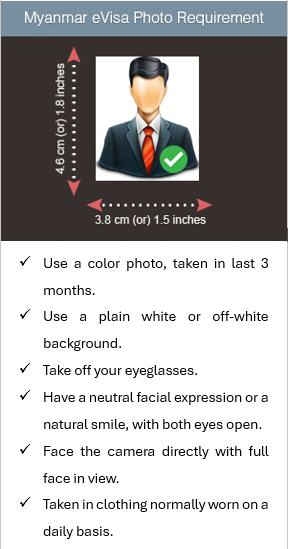
Myanmar eVisa (evisa.moip.gov.mm) applicant photo: tourist and business eVisa
Use a plain white or off-white background.
Official page, read on 5 November 2026.
New Zealand
-
New Zealand Electronic Travel Authority (NZeTA) photo, online form
have good contrast between your face and the background.
cropping your head and shoulders to place it on a plain background
Official page, read on 4 November 2026. -
New Zealand passport (digital photo)
There must be a strong contrast between your face and the background, and no shadows or objects behind your head.
Official page, read on 4 November 2026. -
New Zealand passport for a baby or child (digital photo)
There must be a strong contrast between your face and the background, and no shadows or objects behind your head.
Official page, read on 4 November 2026. -
New Zealand visa application photo (online upload; 35x45 mm prints for paper forms)
cropping your head and shoulders to place it on a plain background
Official page, read on 4 November 2026.
Nigeria
-
Nigeria e-Visa (evisa.immigration.gov.ng) applicant photo upload
2. Must be white background.
Official page, read on 5 November 2026. -
Nigerian standard e-passport, online application photo upload (NIS portal, in Nigeria or abroad)
Must have white background.
Official page, read on 4 November 2026.
Oman
-
Oman eVisa personal photo (Royal Oman Police eVisa portal)
Clear background.
Official page, read on 4 November 2026.
Pakistan
-
Pakistan online visa (Pakistan Online Visa System, visa.nadra.gov.pk) applicant photograph
Taken against a plain white background.
Be taken with a plain light-colored background
Official page, read on 5 November 2026. -
Pakistani passport, online application for Pakistanis abroad (DGI&P e-Services portal, photo upload)
Be taken against a plain white background
Official page, read on 4 November 2026.
Philippines
-
Philippine visa (9(a) temporary visitor and other non-immigrant visas at embassies and consulates)
One (1) colored photo 1.77″ x 1.37″ (3.5 cm x 4.5 cm), taken within six months before the date of application, showing a clear front view of the applicant’s face, with a white background; no eyeglasses or sleeveless attire. Digital photographs are not accepted;
Official page, read on 4 November 2026.
Qatar
-
Qatar e-visa personal photo (Hayya platform: tourist and other Hayya entry visas)
The background should be plain, even, uniform, and free of shadows or glare.
Be taken against a plain white or light grey background.
Official page, read on 4 November 2026.
Russia
-
Russian unified e-visa (единая электронная виза) applicant face photo
The photo must be taken with a plain light-colored background with no shadows.
Official page, read on 4 November 2026.
Saudi Arabia
-
Saudi Arabia tourist e-visa (Visit Saudi eVisa) personal photo
The background should be white. The background should not have any pattern. The photo should show only the person to be photographed (no other persons (group pictures) or objects in the photo). No shadows must be shown on the background.
Official page, read on 4 November 2026.
Schengen Area (France-Visas and German missions quoted)
-
Schengen short-stay visa (type C) application photo, ICAO format
be taken with a plain light-coloured background
Official page, read on 4 November 2026.
Singapore
-
Singapore entry visa application photo (ICA e-Service upload 400 x 514 px, or a 35 x 45 mm print with Form 14A)
The photo background must be white in colour
Official page, read on 4 November 2026. -
Singapore passport photo (MyICA online application 400 x 514 px, or a 35 x 45 mm print with the overseas form)
Of plain white background (if your hair is white, the background must be light grey);
Official page, read on 12 November 2026.
South Africa
-
South African passport (tourist, child, official), printed photos where not captured live
be taken with a light grey or plain cream-coloured background
Official page, read on 4 November 2026.
South Korea
-
South Korea visa application photo (visa form and Korea Visa Portal e-Form, 3.5 x 4.5 cm)
Color photograph of face, front view, on white background, taken within the past six months
Official page, read on 4 November 2026.
Taiwan
-
Taiwan (Republic of China) visa application photo (paper photos for a visitor or resident visa at a Taiwan overseas mission)
Photos with a white color background
Official page, read on 4 November 2026.
Tanzania
-
Tanzania e-Visa (visa.immigration.go.tz) applicant photo
The photo must be colored with plain background.
There should not be any distracting shadows or images on the face or on the background.
Official page, read on 5 November 2026.
Thailand
-
Thailand e-Visa (thaievisa.go.th) applicant photograph
Photo: Upload a high-resolution photo with white background only. The photo must be taken within the last 6 months (JPG / JPEG format, at least 300 PPI, size not exceeding 3 MB) Click here for example.
Official page, read on 4 November 2026.
Turkey (Türkiye)
-
Türkiye residence permit (ikamet izni) biometric photo: e-İkamet upload and prints for the appointment
Must have been taken within the last 6 months, against a white background, biometric and comply with ICAO standards.
Official page, read on 4 November 2026.
United Kingdom
-
UK Electronic Travel Authorisation (ETA), face photo
be in clear contrast to the background
be taken against a plain light-coloured background
Official page, read on 4 November 2026. -
UK passport for a baby or child, paper application (printed photos)
be taken against a plain cream or light grey background
Official page, read on 4 November 2026. -
UK passport, online application (digital photo)
be in clear contrast to the background
be taken against a plain light-coloured background
Official page, read on 4 November 2026. -
UK passport, paper application (printed photos)
be taken against a plain cream or light grey background
Official page, read on 4 November 2026.
United Kingdom (Northern Ireland)
-
Northern Ireland photocard driving licence (DVA), printed photo for postal applications
use a plain light-coloured background with no patterns or textures and don't have
in colour, not black and white, against a light grey or cream background
Official page, read on 5 November 2026.
United States
-
DACA request photos (Form I-821D, Consideration of Deferred Action for Childhood Arrivals, filed with Form I-765)
The photos must have a white to off-white background, be printed on thin paper with a glossy finish, and be unmounted and unretouched.
Official page, read on 5 November 2026. -
Diversity Visa (DV, green card lottery) entry digital photo
Taken in front of a plain white or off-white background
Official page, read on 4 November 2026. -
Diversity Visa (DV, green card lottery) entry digital photo for a child or baby listed on the entry
Taken in front of a plain white or off-white background
Lay your baby on his or her back on a plain white or off-white sheet. This will ensure your baby's head is supported and provide a plain background for the photo. Make certain there are no shadows on your baby's face, especially if you take a picture from above with the baby lying down.
Official page, read on 4 November 2026. -
Green Card application (adjustment of status), Form I-485 photos
The photos must have a white to off-white background, be printed on thin paper with a glossy finish, and be unmounted and unretouched.
Official page, read on 4 November 2026. -
Petition for Alien Fiancé(e), Form I-129F (K-1 fiancé(e) or K-3 spouse) photos of the petitioner and the beneficiary
The photos must have a white to off-white background, be printed on thin paper with a glossy finish, and be unmounted and unretouched.
The photos must be in color with full face, frontal view on a white to off-white background.
Official page, read on 4 November 2026. -
Petition for Alien Relative, Form I-130 / I-130A, spouse petition photos (petitioner and spouse)
The photos must have a white to off-white background, be printed on thin paper with a glossy finish, and be unmounted and unretouched.
The photos must be in color with full face, frontal view on a white to off-white background.
Official page, read on 4 November 2026. -
U.S. Certificate of Citizenship photos, Form N-600, and replacement naturalization/citizenship document photos, Form N-565 (applicants living outside the U.S.)
The photos must have a white to off-white background, be printed on thin paper with a glossy finish, and be unmounted and unretouched.
Official page, read on 5 November 2026. -
U.S. naturalization photos, Form N-400 (Application for Naturalization), applicants residing outside the U.S.
The photos must have a white to off-white background, be printed on thin paper with a glossy finish, and be unmounted and unretouched.
Official page, read on 5 November 2026. -
U.S. passport (book or card)
Use a plain white or off-white background free of shadows, textures, or objects.
Official page, read on 4 November 2026. -
U.S. passport for a baby or young child (printed photo with Form DS-11)
For background, place your child on a plain white or off-white sheet. You can also cover a car seat with the sheet, then place your child in the car seat for the photo.
Use a plain white or off-white background free of shadows, textures, or objects.
Official page, read on 4 November 2026. -
U.S. travel document photos, Form I-131 (advance parole, TPS travel authorization, refugee travel document from abroad)
The photos must have a white to off-white background, be printed on thin paper with a glossy finish, and be unmounted and unretouched.
Official page, read on 4 November 2026. -
U.S. visa photo (DS-160 / DS-1648 nonimmigrant digital image; DS-260 immigrant visa prints)
Taken in front of a plain white or off-white background
Official page, read on 4 November 2026. -
U.S. visa photo for a baby or child (DS-160 / DS-1648 digital image; DS-260 prints)
Taken in front of a plain white or off-white background
Lay your baby on his or her back on a plain white or off-white sheet. This will ensure your baby's head is supported and provide a plain background for the photo. Make certain there are no shadows on your baby's face, especially if you take a picture from above with the baby lying down.
Official page, read on 11 November 2026. -
U.S. work permit (Employment Authorization Document, EAD), Form I-765 photos
The photos must have a white to off-white background, be printed on thin paper with a glossy finish, and be unmounted and unretouched.
Official page, read on 4 November 2026.
Vietnam
-
Vietnam e-Visa (evisa.gov.vn) applicant portrait photo
Note: The visa applicant's photo must be a recent 4x6 cm image in JPG or JPEG format, with a file size of less than 2MB. The photo should be a front-facing image with no hat, no glasses, in formal attire, and with a white background.
Official page, read on 4 November 2026.
Questions
- Which authorities' rules are quoted here?
- 78 documents from 37 countries. Each quote is from the issuing authority's own page, linked beside it, with the date we read it. Rules change: the official page is the one that counts.
- Does the check mean my photo will be accepted?
- No. The check compares your photo with the published rules as we read them on the date each page gives. Only the authority decides whether it accepts a photo.
- Is my photo uploaded?
- No. The check runs in your browser and the photo stays on your device. The one exception is the Detail check, which is opt-in and comes with a document's photo.