Passport, visa and ID photos · Fix a photo
Glasses and glare in a passport photo: what the rules say
Some documents ban glasses outright, others allow them without glare, tint or a frame over the eyes. Here is how to take the photo either way, then what each authority's own page says.
Your photo stays on your device: nothing is uploaded, and no face is recognised.
How to fix it
- If your document's rules say no glasses, take them off: that is the whole fix.
- Where glasses are allowed, face a window and switch the flash off: glare is the reflection of a lamp.
- Tip the glasses slightly forward by lifting the arms off your ears a little, until the reflection leaves the lenses.
- Check that the frame doesn't cross your eyes and the lenses aren't tinted.
The free check does not judge glasses: your document's page states its glasses rule and asks you to confirm it. The opt-in Detail check that comes with a document's photo points out glasses and glare.
Check your photo against your document's rules
Choose your document: its page checks your photo in your browser, free. The indented words are the issuing authority's own, from the official page linked beside them, read on the date given. WinPhoto is not affiliated with any government. Only the authority decides whether it accepts a photo.
Armenia
-
Armenia e-Visa (evisa.mfa.am) facial photo upload
With Glasses
Official page, read on 5 November 2026.
Australia
-
Australian citizenship application photo (ImmiAccount upload; 35-40 x 45-50 mm print for paper and Form 1195)
Glasses must be removed
Vision impairment alone is not an acceptable reason to wear glasses in a citizenship photo.
Official page, read on 4 November 2026. -
Australian passport (printed photos)
You must not wear glasses in a passport photo unless you can't remove them for medical reasons. Vision impairment alone is not an acceptable reason to wear glasses in your photo.
Official page, read on 4 November 2026. -
Australian visa application photo (ImmiAccount digital upload; passport-size print for paper)
Glasses worn by the applicant should be removed unless they cannot be removed for medical reasons. If worn, glasses should be untinted (except for medical reasons), the frames should not obscure the applicant’s eyes and there should not be any reflection from the lenses.
Official page, read on 4 November 2026. -
Australian visa photo for a baby or child (ImmiAccount digital upload; passport-size print for paper)
Glasses worn by the applicant should be removed unless they cannot be removed for medical reasons. If worn, glasses should be untinted (except for medical reasons), the frames should not obscure the applicant’s eyes and there should not be any reflection from the lenses.
Official page, read on 12 November 2026.
Belgium
-
Belgian passport and electronic identity card (eID), printed photo
The eyes are perfectly visible: no reflecting or tinted glasses, frames should not be too big but not too close to the eyeline either. To avoid any difficulties, if you wear glasses, you can remove them for your photo, even if you wear them daily.
Official page, read on 4 November 2026.
Canada
-
Canada Temporary Resident (visitor) Visa application photo (IRCC)
You may wear non-tinted prescription glasses as long as your eyes are clearly visible. Make sure that the frame does not cover any part of your eyes. Sunglasses are not acceptable.
Official page, read on 15 November 2026. -
Canada permanent residence / permanent resident (PR) card photo
Glasses: eyes clearly visible behind the glasses, with no glare on the lenses
Official page, read on 15 November 2026. -
Canada study permit application photo (IRCC)
You may wear non-tinted prescription glasses as long as your eyes are clearly visible. Make sure that the frame does not cover any part of your eyes. Sunglasses are not acceptable.
Official page, read on 15 November 2026. -
Canada super visa (parents and grandparents) application photo (IRCC)
You may wear non-tinted prescription glasses as long as your eyes are clearly visible. Make sure that the frame does not cover any part of your eyes. Sunglasses are not acceptable.
Official page, read on 15 November 2026. -
Canada work permit application photo (IRCC), with the International Experience Canada digital photo
You may wear non-tinted prescription glasses as long as your eyes are clearly visible. Make sure that the frame does not cover any part of your eyes. Sunglasses are not acceptable.
Official page, read on 15 November 2026. -
Canadian citizenship application photo (citizenship grant, proof of citizenship certificate, renunciation)
sunglasses or tinted eye glasses
there is no glare on the lenses
Official page, read on 4 November 2026. -
Canadian passport, in person or by mail (printed photos)
There must be no glare on the lenses.
Official page, read on 4 November 2026. -
Canadian passport, online renewal (digital photo)
glasses, if your eyes are clearly visible and there is no glare on the lenses
Official page, read on 4 November 2026.
China
-
Chinese visa application photo (paper 33x48 mm and online-form digital photo)
Eyeglasses are allowed except thick-rimmed, tinted or glare glasses. Hat or other head wears are only permitted due to religious reasons, but any facial features should not be obscured.
Official page, read on 4 November 2026.
Ghana
-
Ghana biometric passport, online application photo upload (passport.mfa.gov.gh, in Ghana or at a mission)
No glasses or sunglasses (except medical)
Official page, read on 4 November 2026.
India
-
India e-Visa (e-Tourist, e-Business, e-Medical, etc.) applicant photograph
Photo should present full face, front view, eyes open and without spectacles
Official page, read on 4 November 2026. -
Indian passport (paper form at DPC/SPC/CSC in India; ICAO digital upload for applications through Indian missions abroad)
Glares on eyeglasses should be avoided with a slight upward or downward tilt of the head
Photograph with dark background or in uniform, or with eyes hidden under coloured or dark glasses will not be accepted
Official page, read on 4 November 2026.
Ireland
-
Irish passport book or passport card, online application (digital photo)
You can wear glasses. The frame must not cover any part of your eyes. There must be no glare on the lenses. Dark glasses are not permitted.
Official page, read on 4 November 2026.
Jamaica
-
Jamaican passport photo (35 x 45 mm prints; digital photo for the PICA online adult renewal)
Eye glasses should not have tinted lenses
Official page, read on 4 November 2026.
Japan
-
Japan visa application photo (paper form at an embassy, consulate or accredited agency)
Do not use filters commonly used on social media. Have someone else take your photo. No selfies. Take off your eyeglasses for your photo.
Official page, read on 4 November 2026.
Kuwait
-
Kuwait e-visa face photo (Ministry of Interior Kuwait Visa platform: tourist and family visit visas)
There must be no shadows or glare in the image or in the background
Official page, read on 4 November 2026.
Laos
-
Laos eVisa (laoevisa.gov.la) applicant photo
Glasses frame covering eyes
Tintes glasses
Official page, read on 5 November 2026.

Myanmar
-
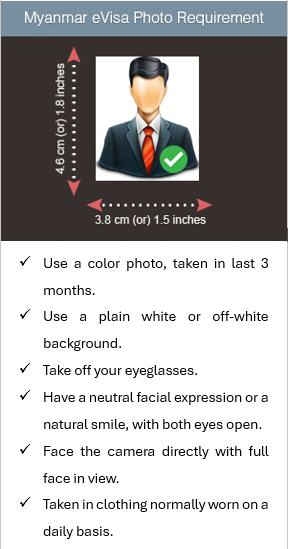
Myanmar eVisa (evisa.moip.gov.mm) applicant photo: tourist and business eVisa
Take off your eyeglasses.
Official page, read on 5 November 2026.
New Zealand
-
New Zealand Electronic Travel Authority (NZeTA) photo, online form
You can wear prescription glasses.
are clear and not tinted — no sunglasses
Official page, read on 4 November 2026. -
New Zealand passport (digital photo)
You can wear prescription glasses in your photo if they are not tinted or thick-framed. You cannot wear sunglasses.
Official page, read on 4 November 2026. -
New Zealand visa application photo (online upload; 35x45 mm prints for paper forms)
You can wear prescription glasses.
Official page, read on 4 November 2026.
Oman
-
Oman eVisa personal photo (Royal Oman Police eVisa portal)
Remove glasses
Official page, read on 4 November 2026.
Pakistan
-
Pakistan online visa (Pakistan Online Visa System, visa.nadra.gov.pk) applicant photograph
The photograph must show your eyes clearly with no glasses on.
Official page, read on 5 November 2026. -
Pakistani passport, online application for Pakistanis abroad (DGI&P e-Services portal, photo upload)
With your eyes not covered by sunglasses, tinted glasses, glasses frames or hair
With eyes open, visible and free from reflection or glare from glasses
Official page, read on 4 November 2026.
Philippines
-
Philippine visa (9(a) temporary visitor and other non-immigrant visas at embassies and consulates)
One (1) colored photo 1.77″ x 1.37″ (3.5 cm x 4.5 cm), taken within six months before the date of application, showing a clear front view of the applicant’s face, with a white background; no eyeglasses or sleeveless attire. Digital photographs are not accepted;
Official page, read on 4 November 2026.
Qatar
-
Qatar e-visa personal photo (Hayya platform: tourist and other Hayya entry visas)
Do not wear sunglasses or colored/dim glasses.
If you normally wear glasses, ensure your eyes are clearly visible in the photo.
Official page, read on 4 November 2026.
Russia
-
Russian unified e-visa (единая электронная виза) applicant face photo
If you wear glasses, your eyes must be clearly visible in the photo. Flash reflection off the lenses, as well as tinted lenses are not allowed (if possible, avoid heavy frames – wear lighter framed glasses, if you have them). Make sure that the frames do not cover your eyes (even partly).
Official page, read on 4 November 2026.
Schengen Area (France-Visas and German missions quoted)
-
Schengen short-stay visa (type C) application photo, ICAO format
the photograph must show your eyes clearly with no flash reflection off the glasses, and no tinted lenses (if possible, avoid heavy frames— wear lighter framed glasses if you have them)
Official page, read on 4 November 2026.
Singapore
-
Singapore entry visa application photo (ICA e-Service upload 400 x 514 px, or a 35 x 45 mm print with Form 14A)
Spectacle lenses must not reflect or glare
Official page, read on 4 November 2026. -
Singapore passport photo (MyICA online application 400 x 514 px, or a 35 x 45 mm print with the overseas form)
lf you wear glasses, the frames must not cover any part of your eyes. There should not be any flash or light reflected off the glasses. Tinted glasses and sunglasses are not allowed.
Official page, read on 12 November 2026.
South Africa
-
South African passport (tourist, child, official), printed photos where not captured live
the photograph must show your eyes clearly with no flash reflection off the glasses
Official page, read on 4 November 2026.
South Korea
-
South Korea visa application photo (visa form and Korea Visa Portal e-Form, 3.5 x 4.5 cm)
5. No sunglasses or hats, except for medical/disability reasons
Official page, read on 4 November 2026.
Taiwan
-
Taiwan (Republic of China) visa application photo (paper photos for a visitor or resident visa at a Taiwan overseas mission)
The photograph must show the eyes clearly with no reflection or glare on the glasses. Please avoid tinted glasses (exceptions may be made for the visually impaired).
Official page, read on 4 November 2026.
Tanzania
-
Tanzania e-Visa (visa.immigration.go.tz) applicant photo
If the applicant regularly wears eye glasses he/she is allowed to take a photo with his glasses on.
Official page, read on 5 November 2026.
Thailand
-
Thailand e-Visa (thaievisa.go.th) applicant photograph
If you are wearing spectacles ensure that flash is not coming on the eyeballs.
Official page, read on 4 November 2026.
United Kingdom
-
UK Electronic Travel Authorisation (ETA), face photo
Do not wear glasses in your photo unless you have to. If you have to wear glasses they cannot be sunglasses or tinted glasses, and your eyes cannot be covered by the frames or glare, reflection or shadow. Your eyes must be seen clearly.
Official page, read on 4 November 2026. -
UK passport, online application (digital photo)
Do not wear glasses in your photo unless you have to do so. If you must wear glasses, they cannot be sunglasses or tinted glasses, and you must make sure your eyes are not covered by the frames or any glare, reflection or shadow.
Official page, read on 4 November 2026. -
UK passport, paper application (printed photos)
Do not wear glasses in your photo unless you have to do so. If you must wear glasses, they cannot be sunglasses or tinted glasses, and you must make sure your eyes are not covered by the frames or any glare, reflection or shadow.
Official page, read on 4 November 2026.
United Kingdom (Northern Ireland)
-
Northern Ireland photocard driving licence (DVA), printed photo for postal applications
take your glasses off if you can - if you need to keep your glasses on, your eyes must be visible without any glare or reflections
remove your glasses to avoid the possibility of rejection
Official page, read on 5 November 2026.
United States
-
Diversity Visa (DV, green card lottery) entry digital photo
Eyeglasses are no longer allowed in new visa photos, except in rare circumstances when eyeglasses cannot be removed for medical reasons; e.g., the applicant has recently had ocular surgery and the eyeglasses are necessary to protect the applicant's eyes.
Official page, read on 4 November 2026. -
Diversity Visa (DV, green card lottery) entry digital photo for a child or baby listed on the entry
Do not wear eyeglasses.
Official page, read on 4 November 2026. -
U.S. passport (book or card)
Take off any eyeglasses, sunglasses, or tinted glasses. Do not rest them on your head for the photo.
If you cannot remove your glasses for medical reasons, please include a signed note from your doctor with your application.
Official page, read on 4 November 2026. -
U.S. visa photo (DS-160 / DS-1648 nonimmigrant digital image; DS-260 immigrant visa prints)
Eyeglasses are no longer allowed in new visa photos, except in rare circumstances when eyeglasses cannot be removed for medical reasons; e.g., the applicant has recently had ocular surgery and the eyeglasses are necessary to protect the applicant's eyes.
Official page, read on 4 November 2026. -
U.S. visa photo for a baby or child (DS-160 / DS-1648 digital image; DS-260 prints)
Eyeglasses are no longer allowed in new visa photos, except in rare circumstances when eyeglasses cannot be removed for medical reasons; e.g., the applicant has recently had ocular surgery and the eyeglasses are necessary to protect the applicant's eyes.
Official page, read on 11 November 2026.
Vietnam
-
Vietnam e-Visa (evisa.gov.vn) applicant portrait photo
Note: The visa applicant's photo must be a recent 4x6 cm image in JPG or JPEG format, with a file size of less than 2MB. The photo should be a front-facing image with no hat, no glasses, in formal attire, and with a white background.
Official page, read on 4 November 2026.
Questions
- Can I wear glasses in a passport or visa photo?
- It depends on the document. Of the documents WinPhoto ID checks whose rules speak of glasses, 20 say to take them off, 6 accept them only when they are needed, and 36 accept them without glare or tint. Choose your document below for its own rule.
- Which authorities' rules are quoted here?
- 51 documents from 30 countries. Each quote is from the issuing authority's own page, linked beside it, with the date we read it. Rules change: the official page is the one that counts.
- Does the check mean my photo will be accepted?
- No. The check compares your photo with the published rules as we read them on the date each page gives. Only the authority decides whether it accepts a photo.
- Is my photo uploaded?
- No. The check runs in your browser and the photo stays on your device. The one exception is the Detail check, which is opt-in and comes with a document's photo.